DiveSpot Dive centre listings
Dive centre listings, kept up to date from their own websites.
How DiveSpot uses Allscreenshots to fill in dive centre listings with AI extraction, and to show its admins what changed when a dive centre updates its website.
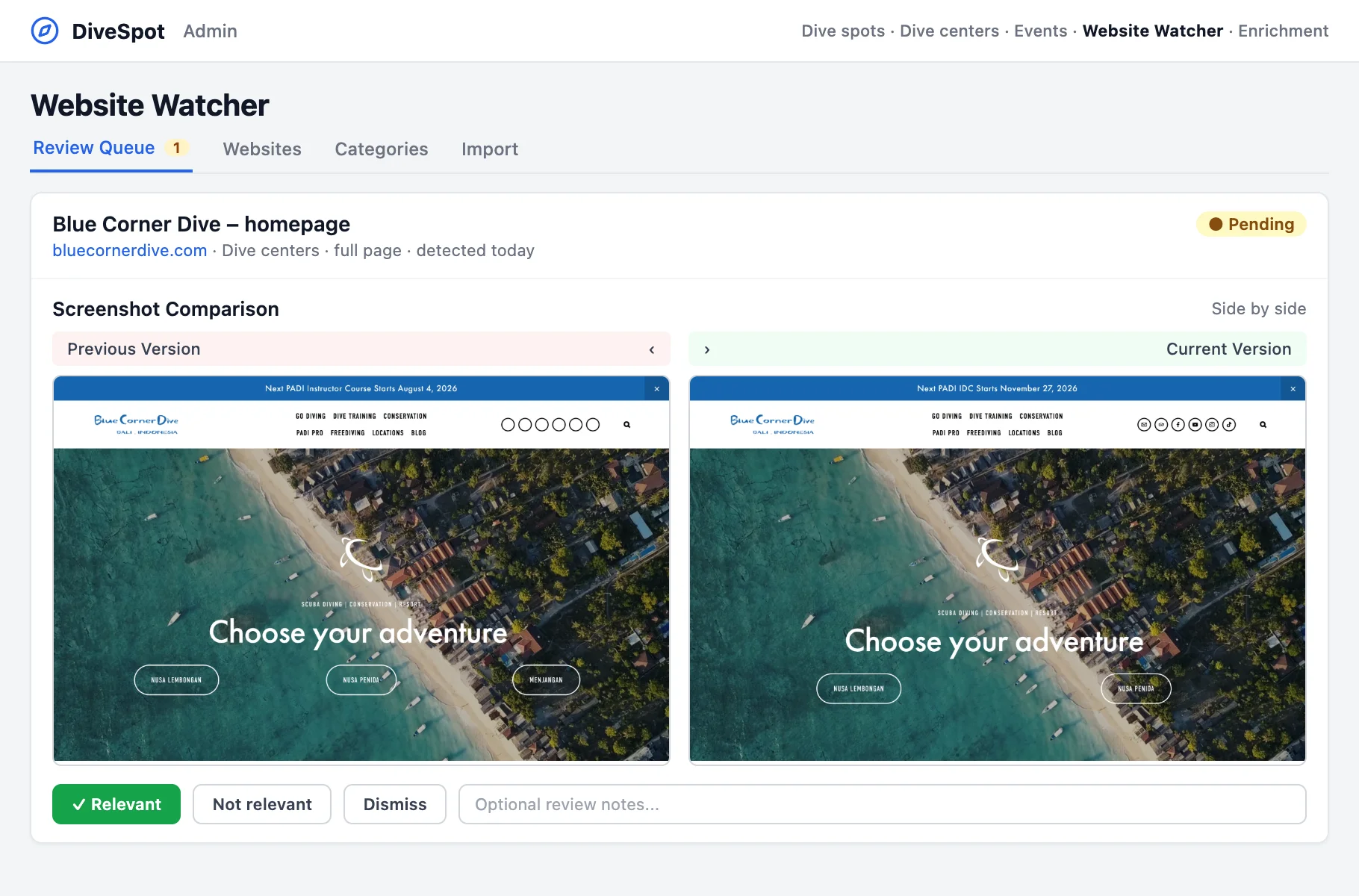 Captured by Allscreenshots
- Customer
- DiveSpot
- Use case
- Listing details and change review
- Where it appears
- DiveSpot admin
DiveSpot is a guide to diving. It lists dive spots around the world and the dive centres that take people out to them.
Most of what a dive centre listing needs is already on the dive centre's own website, and that website changes during the season as trips fill up and new dates are added. Dive centres rarely tell DiveSpot when this happens, so DiveSpot checks their websites itself.
Filling in a listing from the dive centre's website
When an admin enriches a dive centre, DiveSpot sends its website URL to Allscreenshots. One request returns two things from the same page load: a screenshot of the page and the listing details as JSON.
The JSON comes from AI extraction. DiveSpot sends a JSON Schema with the fields it keeps for a dive centre, such as services, languages, equipment rental, payment methods, opening hours and address. Allscreenshots reads the page and fills in that schema. DiveSpot doesn't write a scraper for each dive centre's layout. If the website doesn't mention a field, the field comes back empty.
Nothing is published straight away. The extracted values go to DiveSpot's enrichment review with the screenshot shown next to them. The admin can compare each value with the page it came from before accepting it. The same screenshot is used as a preview of the dive centre's website on its listing.
Watching for changes
A listing can go out of date the week after it was written. To catch that, DiveSpot's admin has a tool called the Website Watcher. Admins add the pages they want to follow, put them in categories (dive centres and events, for example) and check each one daily or weekly. There is also an import for adding a long list of pages from a spreadsheet.
An hourly job checks the pages that are due. For each one, DiveSpot asks Allscreenshots for a new capture. If the page has changed since the last check, the change goes into a review queue.
In the queue, the new capture is shown next to the previous one, side by side or with a slider. An HTML diff is there as well, but the screenshots are quicker to read: an admin can see that the next instructor course has a new start date, or that a dive centre no longer lists one of its locations, then mark the change as relevant and update the listing.
- 1A check is dueThe hourly job picks up the page.
- 2A new captureAllscreenshots captures the page, or one part of it.
- 3A change to reviewThe old and new captures go into the review queue.
Capturing only the schedule
A dive centre's homepage changes all the time, often in ways DiveSpot has no interest in, like a new photo at the top. What DiveSpot wants to know about is usually the trip schedule.
So each watched page can have a CSS selector, for example .dive-schedule. DiveSpot passes it to Allscreenshots, which captures only that element. When adding a page, the admin can preview the capture to make sure the selector picks the right part of the page.
Clean captures
Dive centre websites tend to be busy. Many have a cookie banner or a newsletter pop-up, and some show ads. A few are behind bot protection that shows automated browsers a challenge page. All of this gets in the way of a review queue, and an ad that rotates between loads makes a page look changed when the schedule is the same.
Allscreenshots removes ads, cookie banners and pop-ups by default. For sites behind Cloudflare, DataDome or similar bot detection, DiveSpot turns on stealth mode, and the capture shows the site itself instead of a captcha. When something is still left on the page, such as a floating video player or a sticky bar repeated down a full-page capture, AI cleanup takes it out.
We think this gives DiveSpot cleaner screenshots than any other screenshot API would. The admins see the page the way a diver would, and when a change shows up in the queue, it is a change to the page.
No browser on the server
The Website Watcher used to run its own headless browser inside DiveSpot's backend and save each screenshot to the server's disk. The browser had to be installed and kept up to date, and every page load used memory on the same server as the rest of DiveSpot. Extracting listing details would have needed a separate pipeline, and the cookie banners and bot checks would have been DiveSpot's problem too.
Now the backend sends a URL to Allscreenshots, with a selector or a schema when it needs one, and gets back an image and JSON. The enrichment review, the schedule, the change detection and the review queue all stayed in DiveSpot.
About DiveSpot
DiveSpot helps divers find their next dive. It covers dive spots worldwide for scuba diving, snorkelling, freediving and spearfishing, along with dive centres, marine life and diving events.
Visit DiveSpotAbout Allscreenshots
Allscreenshots is a screenshot API for developers. It runs the browsers and removes ads, cookie banners and pop-ups from the capture. It can also capture a single element by CSS selector or return the data on a page as JSON.
Explore Allscreenshots
 Hana Kobzová, PPC News Feed